
Running a WooCommerce store is simple at the start. But as your business grows, you need better tools. The right WooCommerce Extensions can improve sales, user experience, and operations. This guide covers top extensions that solve real business problems.
Why Choosing the Right WooCommerce Plugins Matters
Not every plugin adds value. Some slow down your store. Others don’t match your business goals. You should pick tools based on what your users need.
Good WooCommerce Plugins help you:
-
Manage multiple sellers
-
Sell through mobile apps
-
Handle offline sales
-
Improve customer retention
-
Simplify payments
Top WooCommerce Extensions to Consider
Below are some of the most useful extensions for growing stores.
1. Multi Vendor Marketplace Extension
If you want to build a marketplace like Amazon, this extension is essential. A woocommerce multi vendor Marketplace allows multiple sellers to list products on your store.
Key Features:
-
Seller dashboards
-
Commission management
-
Product approvals
-
Separate vendor profiles
Why It Matters:
It helps you scale fast without managing inventory alone. Sellers handle their products, while you earn commission.
Use Case:
Best for businesses that want controlled marketplace growth. You can manage sellers more closely.
2. WooCommerce Mobile App Builder
Mobile commerce is growing fast. A woocommerce mobile app builder helps you convert your store into a mobile app.
Features:
-
Android and iOS apps
-
Push notifications
-
Real-time sync with store
Why You Need It:
Many users prefer shopping on apps. A Woocommerce mobile app improves engagement and repeat purchases.
4. WooCommerce POS (Point of Sale)
If you sell both online and offline, woocommerce POS is a must.
Features:
-
Sync online and offline orders
-
Manage physical store sales
-
Barcode scanning
Benefits:
It helps unify your store operations. You can manage inventory from one place.
5. WooCommerce Wallet System
WooCommerce Wallet system improves user experience by offering a digital wallet.
Features:
-
Store credits
-
Cashback options
-
Fast checkout
Why It Works:
Customers don’t need to enter payment details again. This reduces cart abandonment and increases loyalty.
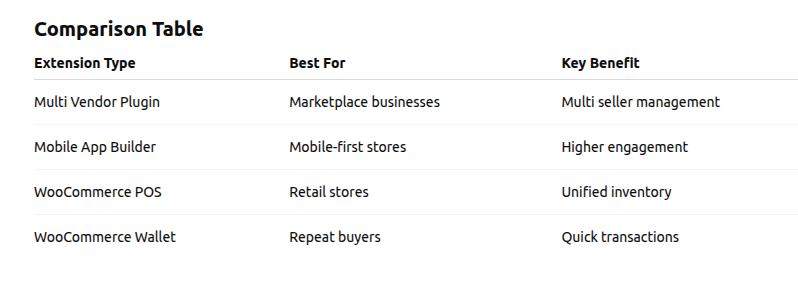
Comparison Table of Key Extensions
Compare each WooCommerce extension based on your business needs, growth goals, and target users.
Pick tools that improve user experience, simplify operations, and support long-term scalability.
Factors to Consider Before Choosing Extensions
1. Business Model
If you want multiple sellers, go for a WooCommerce multi-vendor plugin. For single stores, focus on POS or wallet.
2. User Experience
Think about your users. Do they prefer mobile apps? Then a Woocommerce mobile app is important.
3. Scalability
Choose extensions that grow with your business. Marketplace and POS systems should handle large data.
4. Integration
Make sure the plugin works well with your current setup. Poor integration can slow your site.
5. Support and Updates
Regular updates are important for security and performance.
How These Extensions Improve Conversions
Each extension plays a role in improving sales:
-
Marketplace plugins increase product variety
-
Mobile apps improve engagement
-
POS connects offline buyers
-
Wallets simplify checkout
When combined, these WooCommerce Extensions create a strong ecosystem.
Final Thoughts
The success of your WooCommerce store depends on the tools you use. The right mix of WooCommerce Plugins can improve both user experience and business growth.
Start with your goal. If you want a marketplace, choose a woocommerce multi vendor Marketplace solution. If you want better engagement, invest in a mobile app or wallet system.
Keep your setup simple. Focus on performance and usability. That’s what drives long-term success.
Comments
Post a Comment